Have you ever wondered why some WordPress websites keep growing for years, while others feel outdated and start breaking within just a few months?
The answer is not always about the newest technology or the most advanced design trend. More often, it comes down to the fundamental principles that were applied from the beginning.
In the middle of rapid change in web technology, WordPress is still the top choice for many businesses. But having a WordPress website is not enough if it only exists. It needs to be built with a sustainable approach.
Today, I want to share five fundamental principles that have proven to help WordPress websites not only survive, but continue to grow over time. These principles come from my experience handling hundreds of WordPress websites over more than seven years.
1. Technical Simplicity: Less Is More
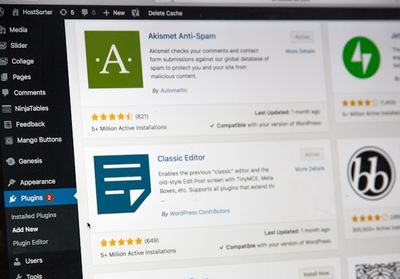
Have you ever heard the phrase “plugin happy”? It describes the situation where website owners keep adding plugins for every small feature they want.
At first, adding a plugin feels like the easiest solution. Need a contact form? Add a plugin. Want a photo gallery? Add another plugin. Need SEO? There is a plugin for that too.
But think about your house. What happens if you keep adding furniture without ever removing the old ones? Right, the house becomes crowded and harder to manage.
WordPress websites work the same way. Every plugin you add is like bringing one more piece of furniture into your digital house.
Why Simplicity Is Better
- Fewer conflicts: plugins often clash, especially if they try to control the same feature.
- Easier management: updating 50 plugins is harder than updating 10.
- Faster performance: every plugin adds more code that must run.
- Better security: every plugin can become a possible attack vector.
What Should You Do?
Audit your plugins regularly. Ask yourself:
- Do I really need this plugin?
- Is there a built-in WordPress feature that can do the same thing?
- Is there a multi-purpose plugin that can replace several separate plugins?
I often find websites with 30+ plugins, and after an audit, we can reduce them to fewer than 15 without losing functionality. One real example is Win Equipment, where we reduced the plugin count from 43 to just 19 essential plugins, which contributed significantly to the site’s speed improvement.
I often meet clients who come with the same complaint: “My website is slow, can you fix it?”
The problem is that they see performance as something to “fix later,” like adding a turbocharger to a car they already bought.
A sustainable approach is to build with performance as a priority from day one. This is not only about speed. It is also about user experience and SEO.
Google has officially treated Core Web Vitals as a ranking factor since May 2021. Users are also less patient than before, and Google research shows that 53% of visitors leave a website if it takes more than 3 seconds to load.
- VPS is usually the right answer: for optimal performance, a VPS with a LEMP stack optimized for WordPress is often the best long-term choice.
- Use GeneratePress with GenerateBlocks: this is the combination I use for most client work. GeneratePress is lightweight and flexible, while GenerateBlocks keeps design options strong without hurting performance.
- Optimize images from the start: do not wait until the site becomes slow.
- Monitor Core Web Vitals: treat metrics like LCP, INP, and CLS as regular KPIs.
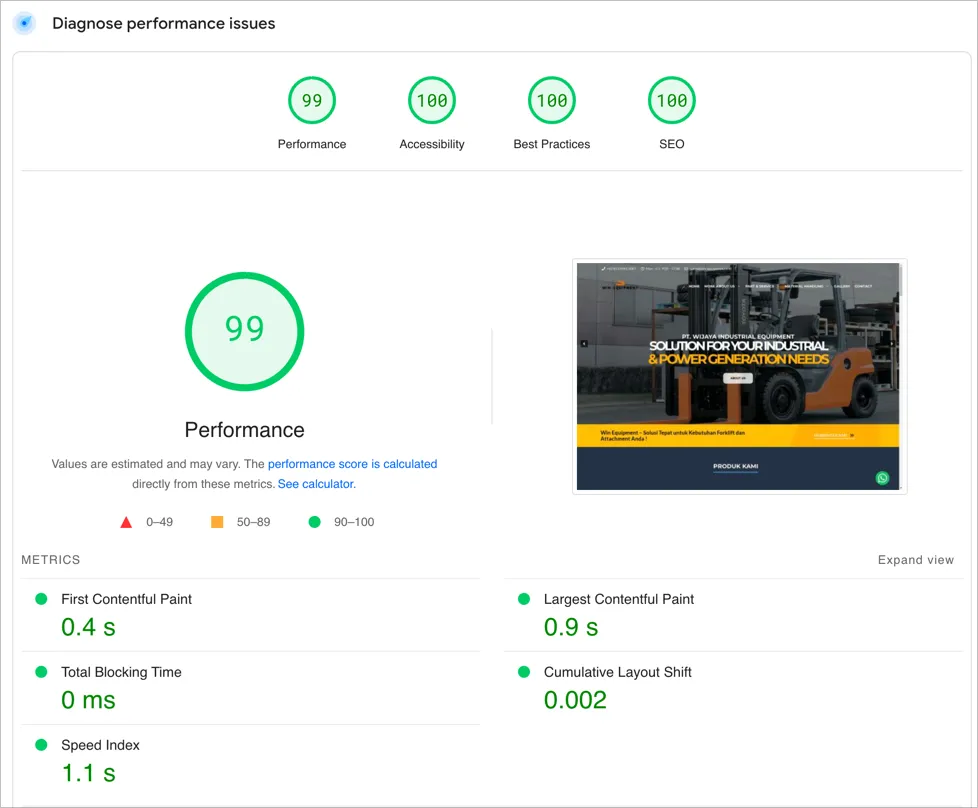
Our work with Win Equipment showed how powerful this approach can be. Their website moved from a PageSpeed score of 27 on mobile and 36 on desktop to 92 on mobile and 99 on desktop. You can read the full case study here.
If you want the same kind of approach for your own site, we also provide WordPress speed optimization with a clear audit and implementation flow.
3. Layered Security: Think Like a Fortress, Not a Lock
Website security is often treated like a feature, something you “buy” through a security plugin. But security is not a product. It is an ongoing process.
Think about your house. You would not rely only on the front door lock, right? You might also have a fence, an alarm system, CCTV, and maybe even a safe for valuables.
WordPress websites need the same layered approach.
Security Layers You Should Apply
- Server level: firewall, secure server configuration, SSL.
- WordPress level: updated core, themes, and plugins.
- Access level: strong passwords, 2FA, login attempt limits.
- Content level: input validation and protection from malicious content injection.
I often find clients relying only on a security plugin without thinking about a full security strategy. That is like locking the front door but leaving the window open.
Change Your Mindset About Updates
Set a regular update schedule at least once a week. If you are on a VPS, 1-2 times a week is even better. For stronger security, I usually recommend NinjaFirewall because it is lightweight but powerful.
WordPress, theme, and plugin updates are not interruptions. They are part of your security strategy.
If your website is business-critical, use a staging environment to test updates before applying them to the live site.
4. Content Sustainability: A Structure That Grows With You
One of the biggest mistakes I see is building a website without thinking about how the content will grow later.
At first, a simple content structure may look enough. But what happens when your business grows and you need new categories? What if you start publishing different content types?
Building a Sustainable Content Structure
- Plan taxonomy carefully: categories and tags are the framework for your content.
- Build a logical hierarchy: structure pages so the site can grow without becoming messy.
- Use custom post types: for testimonials, products, portfolios, and other special content, use CPTs instead of forcing everything into standard posts.
- Design flexible templates: make sure templates can display different content types well.
Planning the structure early saves a lot of time and frustration later.
5. Adaptability: Build for Change
The only thing guaranteed in the web world is change. New browsers appear, standards evolve, and user expectations keep rising.
A website built on the assumption that everything will stay the same for the next five years is almost guaranteed to face problems.
How to Build an Adaptable Website
- Use web standards: avoid hacky techniques that may not survive future changes.
- Separate content and presentation: that makes redesigns easier without affecting the content.
- Document customizations: keep a record of major custom changes for future updates.
- Review regularly: check whether the website still meets current standards and needs.
One real example of adaptability is how websites had to adjust to Google’s mobile-first indexing. Websites that were responsive from the start adapted smoothly. Sites that focused only on desktop had to be rebuilt, at a significant cost in time and money.
Conclusion: A Sustainable Website Is an Investment, Not a Cost
Let’s be honest: building a WordPress website that follows all five principles requires more effort at the start.
But that is an investment that saves time, stress, and money in the long run.
A sustainable website does not just survive from year to year. It grows with your business, adapts to technological changes, and continues to provide value to both visitors and the business itself.
Question for you: which of these five principles is the hardest to apply on your website right now, and why?
If you feel overwhelmed by the complexity of building or maintaining a sustainable WordPress website, do not hesitate to contact us. We help build and maintain WordPress websites that are not only beautiful, but also sustainable long term.