CASE STUDIES

Digital Transformation at PT Zumatic Saka Persada: From Complex to Manageable

Willya Randika |
Case study of the PT Zumatic Saka Persada website redesign

On June 5, 2025, I received a WhatsApp message from the PT Zumatic Saka Persada team. The request was very clear: they wanted a website that felt more organized, easier to manage internally, and no longer dependent on technical help just to update text, images, or pages.

The client said:

Hello Sir, I am considering cleaning up and simplifying my website. I want to be able to edit text, images, and pages myself without technical help. I am interested in migrating to blocks.

From the start, it was clear that the client already understood the value of WordPress blocks and was already interested in moving to a block-based editing workflow.

This was also not our first interaction. Back in September 2023, the client had contacted me to solve several technical issues on the same website. So the June 2025 project was a second phase: no longer a partial fix, but a broader transformation.

Once the discussion and audit started, I found that the challenge was not only about the content editor. The old design had UI and UX issues, the copywriting was not yet strong enough to support conversion, and the technical performance still left a lot of room for improvement. Because of that, I proposed a more comprehensive approach: converting the site to blocks while redesigning it at the same time. The client agreed, and that was the real start of the project.

Short Summary & Key Takeaways

Mobile Performance

53 -> 93 (+75.47%)
Desktop Performance

81 -> 100 (+23.46%)

HTTP Requests

122 -> 64 (-47.54%)

Load Time

3.33s -> 1.70s (-48.95%)

Content Workflow

Raw HTML + heavy builder -> blocks + ACF

Team Adoption

Training 4h -> 1.5h; 90% self-managed content

Want a quick audit to map the biggest improvement opportunities on your website? Get implementation recommendations in a free consultation session. Start a consultation.

Before getting into the technical implementation, here is the context behind PT Zumatic’s original website and why this project needed a more complete transformation.

The Starting Condition & Main Challenges

Phase One (September 2023): Partial Fixes

When the client first contacted me in September 2023, the focus was still on solving a few technical issues. But after evaluation, it became clear that the problems were connected and layered:

Security and maintenance issues:

  • The website often received spam from the contact form.
  • WordPress had not been maintained properly and was still using PHP 7.2.
  • Several plugins were already incompatible because they required at least PHP 7.4.

UX and content issues:

  • The UI design was not very user-friendly.
  • The project table was still built with raw HTML, which made it hard to edit.
  • The website did not yet reflect the professionalism of the company.

Phase Two (June 2025): Full Transformation

When the client came back in June 2025, the need had changed. They wanted a system that the internal team could manage without technical friction. That was the real turning point from “repair” into “transformation.”

Performance Baseline Before Optimization

The initial performance audit showed a fairly weak starting point.

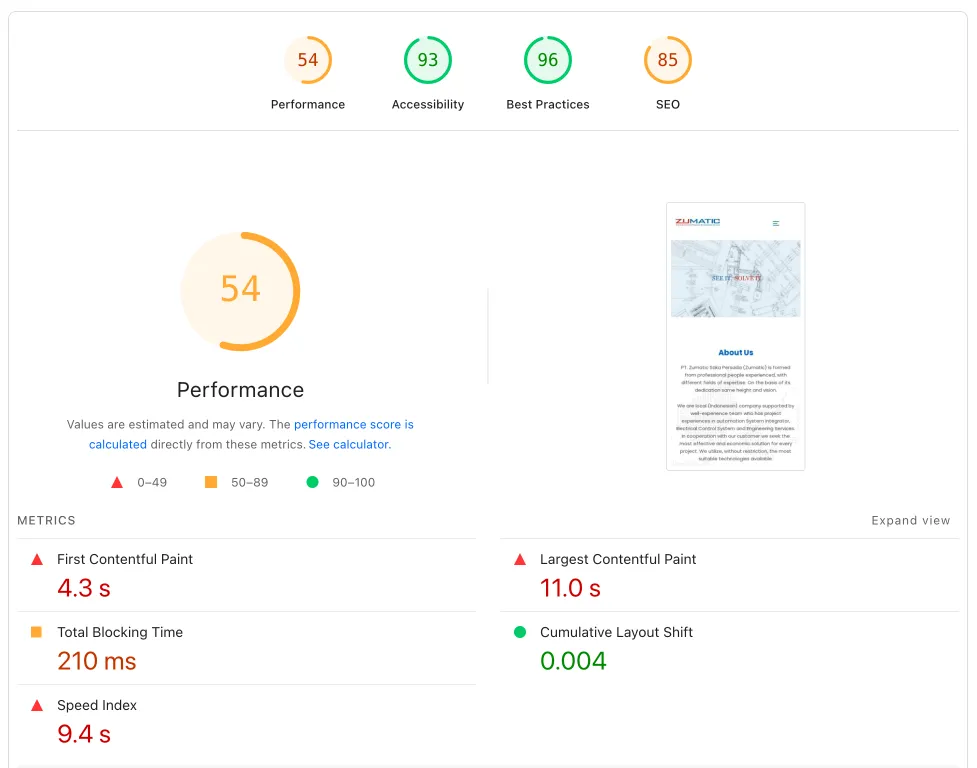
PageSpeed Insights before optimization:

  • Mobile: 53 performance, 93 accessibility, 96 best practices, 85 SEO.
  • Desktop: 81 performance, 98 accessibility, 96 best practices, 85 SEO.

Browser speed test results before:

  • 122 requests
  • 3.1 MB transferred
  • 7.0 MB total resources
  • 3.33s finish time
  • 1.35s DOMContentLoaded

PageSpeed Insights before optimization (PT Zumatic)

Visual Comparison: Before vs After

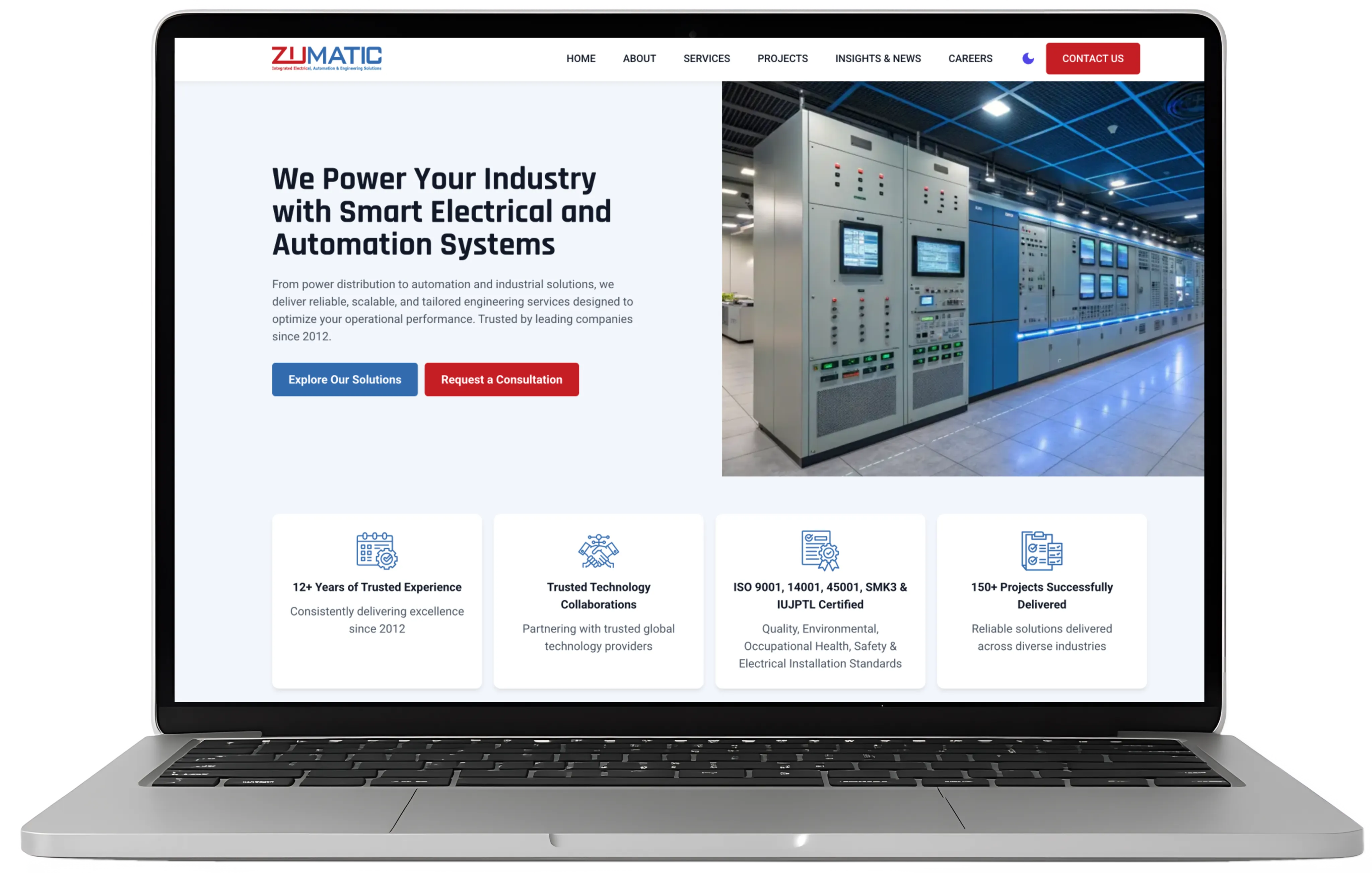
The homepage comparison shows the biggest visible change: from a stiff layout to a more modern, organized, and easier-to-scan structure.
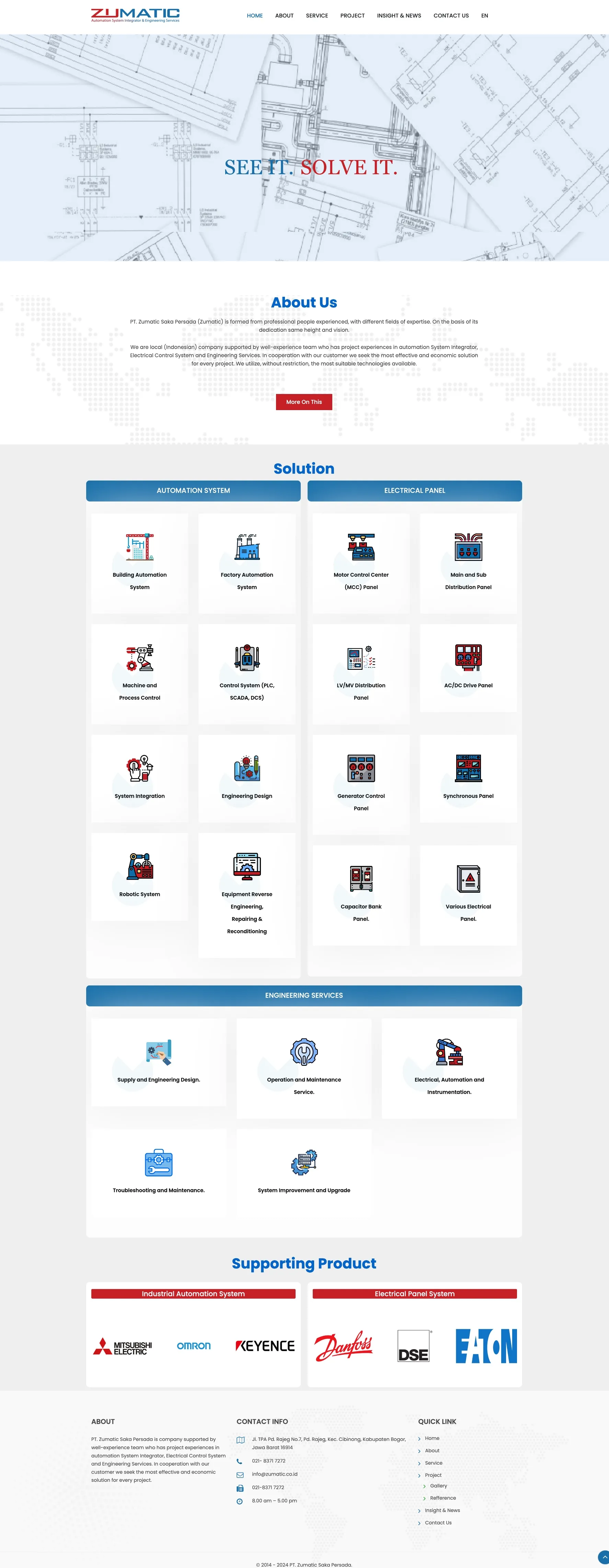
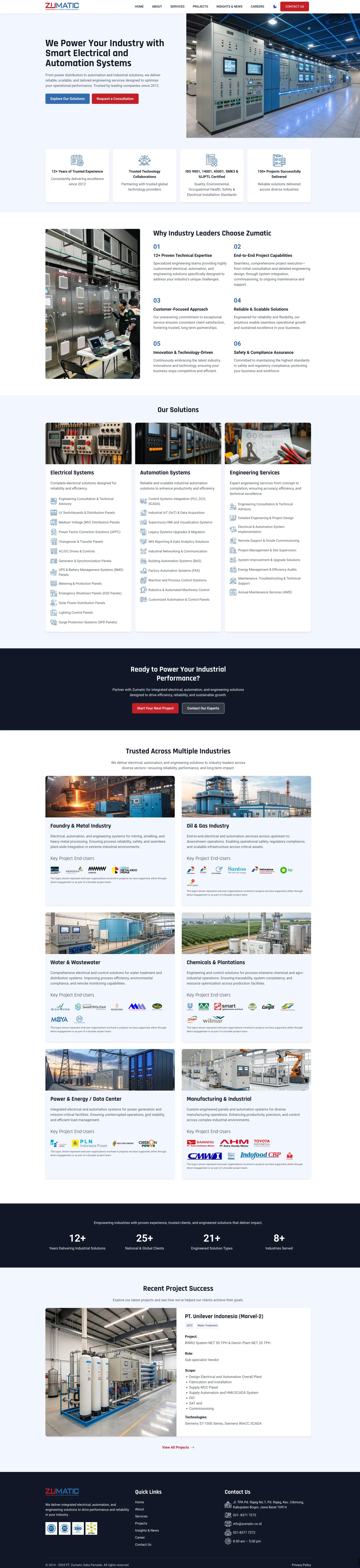
Old homepage with a stiff layout and poorly structured content
Before — Stiff layout, weak content structure.
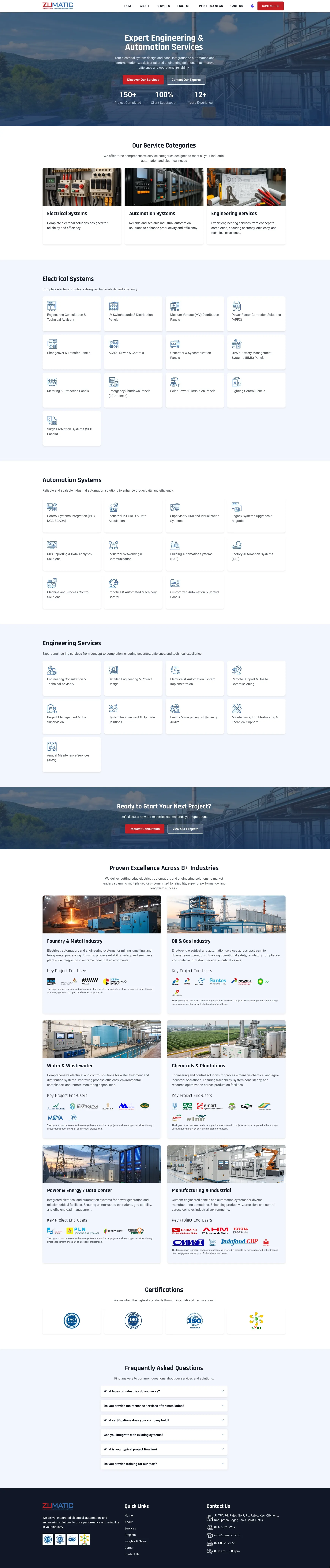
New homepage with cleaner hierarchy, stronger typography, more intuitive navigation, and better content organization
After — Cleaner layout, clearer typography hierarchy, more intuitive navigation, and better content organization.

Contact Page Transformation

The contact page also changed significantly, moving from a very basic layout to something much clearer and more credible for prospective clients:
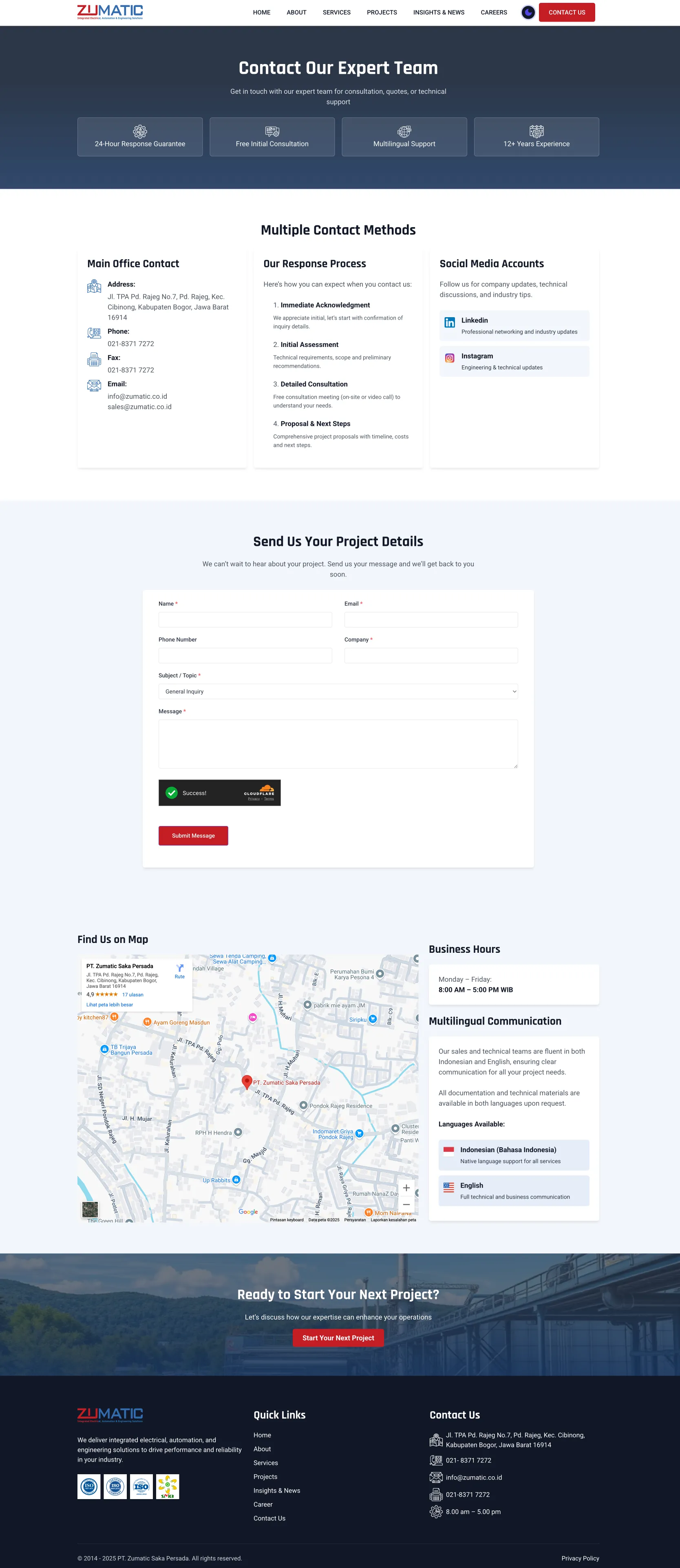
After Contact Page

Content Management Complexity

The biggest operational challenge was content management. It was simply too technical for a non-technical team.

  • The project table was built with raw HTML, which required coding just to edit.
  • There were 20 active plugins, including WPBakery Page Builder, which was relatively complex.
  • Slider Revolution was heavy and difficult to manage for daily use.
  • There was no clear content workflow standard.

The Approach and Methodology

Comprehensive Analysis

I started with a broader audit across five areas:

  1. Technical audit: performance, security, and compatibility.
  2. UX/UI audit: user experience and interface structure.
  3. Content audit: copywriting quality and information hierarchy.
  4. SEO audit: technical viability and on-page fundamentals.
  5. Workflow audit: how the team handled content creation and updates.

Transformation Strategy

Based on the audit, the transformation focused on three main pillars:

  1. Technology simplification
  • Migrating from WPBakery to GenerateBlocks Pro.
  • Reducing plugins from 20 to 15 better-optimized plugins.
  • Using GeneratePress as the theme foundation.
  1. Performance optimization
  • Optimizing code and site assets.
  • Applying a more effective caching setup.
  • Compressing and optimizing images.
  1. A more user-friendly content management workflow
  • Making content management more intuitive.
  • Building a custom plugin for multilingual needs.
  • Using ACF for simpler project management.

Technical Implementation

1. Theme and Page Builder Migration

I moved the website from WPBakery to GenerateBlocks Pro, which is lighter and easier to use. That decision was based on:

  • better performance through cleaner and lighter code
  • a more intuitive editing interface for a non-technical team
  • more flexibility without unnecessary bloat
  • easier long-term maintenance

I also used GeneratePress as the base theme because:

  • the code is very lightweight and well optimized
  • it works very well with GenerateBlocks
  • it stays flexible for long-term customization
  • its developer support is mature and stable

2. Custom Plugin Development

One of the unique needs in this project was a very specific multilingual setup. PT Zumatic only needed dual language support for the Insights & News section. Because of that, I built a custom plugin with these characteristics:

  • targeted implementation: only active on the blog/insights section
  • simple switching: easy-to-understand language toggles
  • backend integration: fits naturally into the WordPress admin workflow

Zumatic multilingual backend

With this setup, the admin team could manage bilingual content without needing a heavy multilingual plugin. In practice, the interface lets the admin:

  1. Add a new article through a cleaner interface.
  2. Set the language from a simple dropdown.
  3. Link two language versions of the same article.
  4. Preview content before publishing.

The main benefits:

  • targeted implementation only where needed
  • a simple interface without too many options
  • more efficient bilingual management

ACF Integration for Project Management

To replace the old raw HTML table system, I prepared:
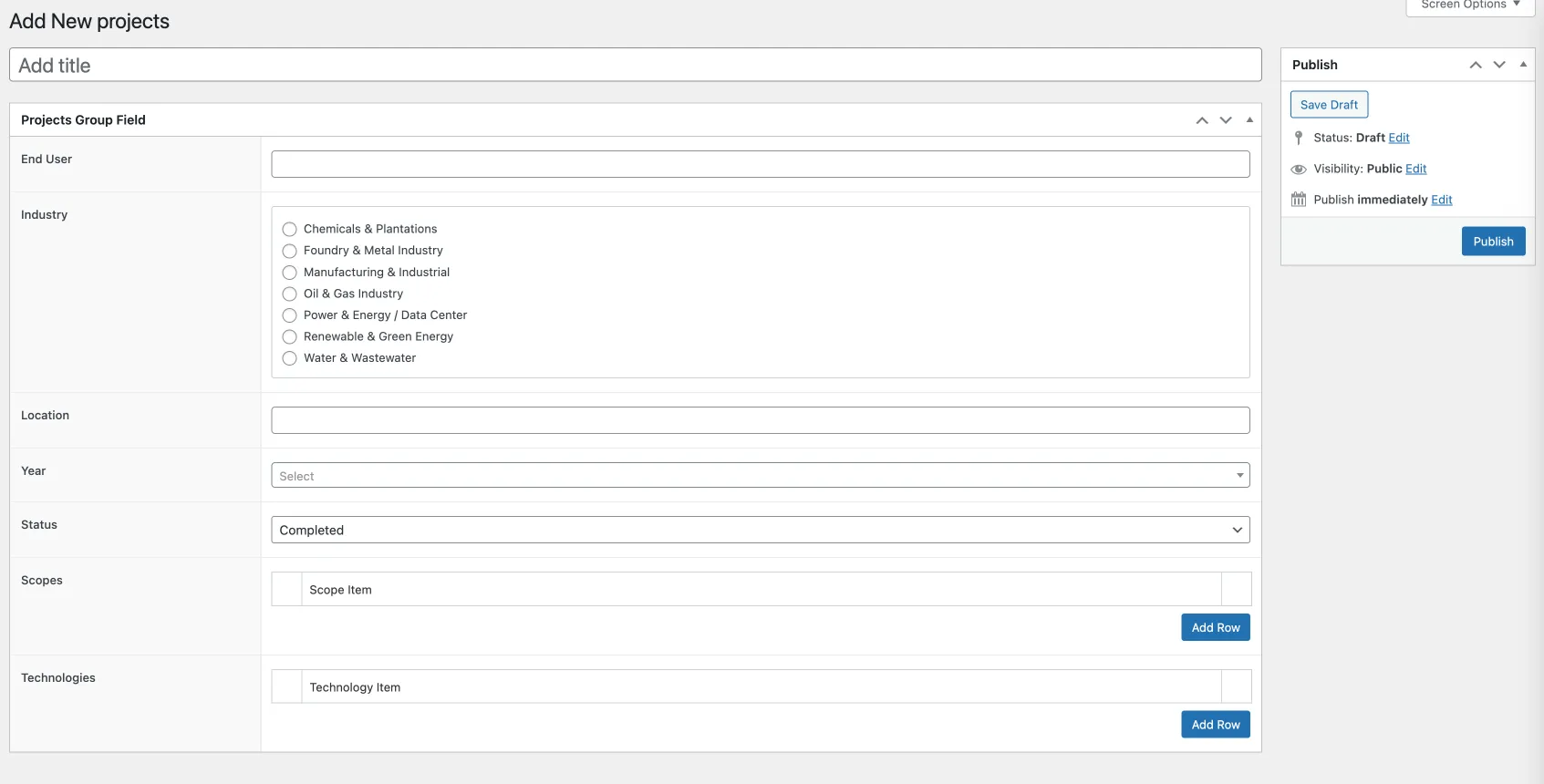
  • a custom post type for projects with structured fields
  • ACF integration for much easier data entry
  • a custom filtering system using GenerateBlocks Pro query blocks
  • a more consistent automatic layout for all projects

Zumatic project management

This changed project input from a raw HTML task into a structured form that was much easier to use.

Project information management:

  • end-user data input through structured fields
  • industry selection through dropdowns
  • location and year through simpler fields
  • status tracking through clearer admin controls

Advanced features:

  • repeater fields for project scope details
  • technology stack input
  • custom filtering integrated with query blocks

Benefits for the PT Zumatic team:

  • no coding required
  • consistent layout
  • easy updates without breaking layout
  • more professional presentation

3. Plugin and Performance Optimization

Plugin Optimization (20 -> 15 Plugins)

Plugins removed or replaced:

  • WPBakery Page Builder -> GenerateBlocks Pro
  • Slider Revolution
  • Ajax Load More -> native WordPress functionality
  • Breadcumb NavXT
  • CL Testimonial
  • some redundant security plugins
  • Contact Form 7 -> Everest Form

New plugins added:

  • GenerateBlocks Pro
  • Asset CleanUp Pro
  • Slim SEO
  • custom multilingual plugin by Harun Studio
  • SCF
  • WPS Hide Login
  • WP SVG Images
  • SmartSMTP

4. Performance Optimization

GeneratePress and GenerateBlocks are already fast on their own, but I still applied a few additional optimizations for stronger results:

Advanced optimization techniques:

  • loading only the CSS and JavaScript that were actually needed, with the help of Asset CleanUp
  • CSS and JavaScript optimization through minification and cleaner delivery
  • image optimization using compression and WebP
  • a more effective caching setup

Results and Transformation Impact

Significant Performance Improvement

PageSpeed Insights after optimization:

MetricBefore MobileAfter MobileBefore DesktopAfter DesktopImprovement
Performance53938110075.47% (Mobile)
Accessibility93100981007.53% (Mobile)
Best Practices96100961004.17%
SEO851008510017.65%

Browser speed test after:

  • Requests: 122 -> 64 (47.54% reduction)
  • Transferred: 3.1 MB -> 4.8 MB (adjusted because of new content assets)
  • Resources: 7.0 MB -> 5.2 MB (25.71% reduction)
  • Finish Time: 3.33s -> 1.70s (48.95% faster)
  • DOMContentLoaded: 1.35s -> 1.44s (maintained)

Note: transferred size increased because of newer content assets, but total resources dropped, request volume dropped significantly, and finish time improved by nearly 49%.
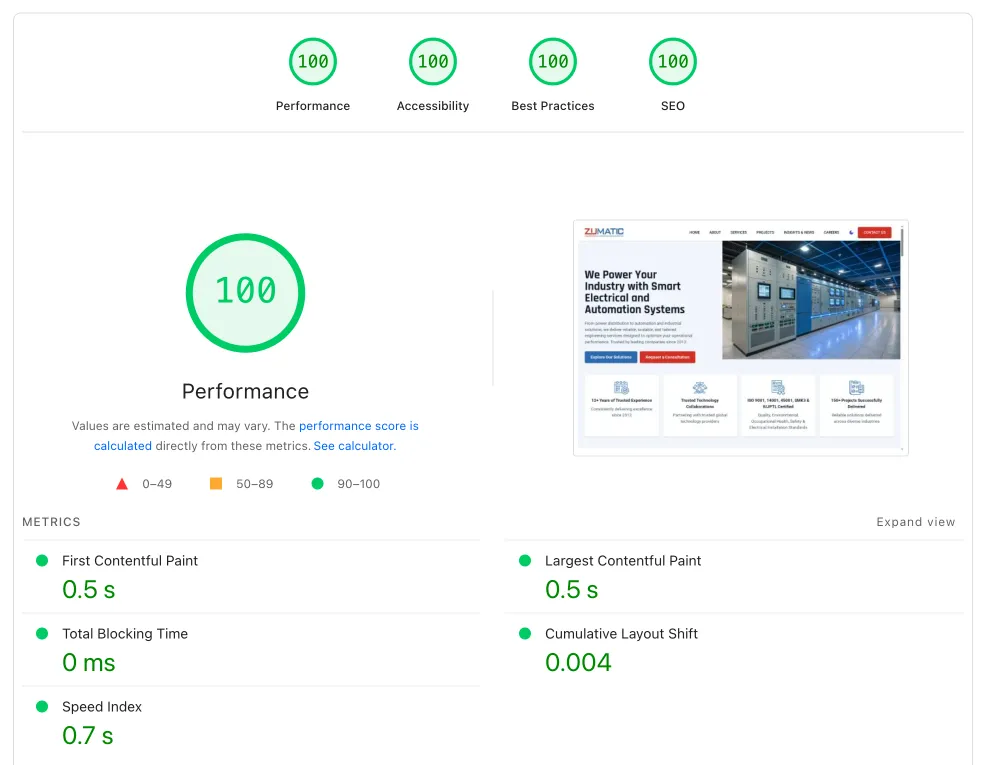
PT Zumatic performance after optimization

Want similar results for your website? Start with a free consultation and we will run a quick audit and suggest a practical implementation path. Contact us.

WordPress Dashboard Transformation

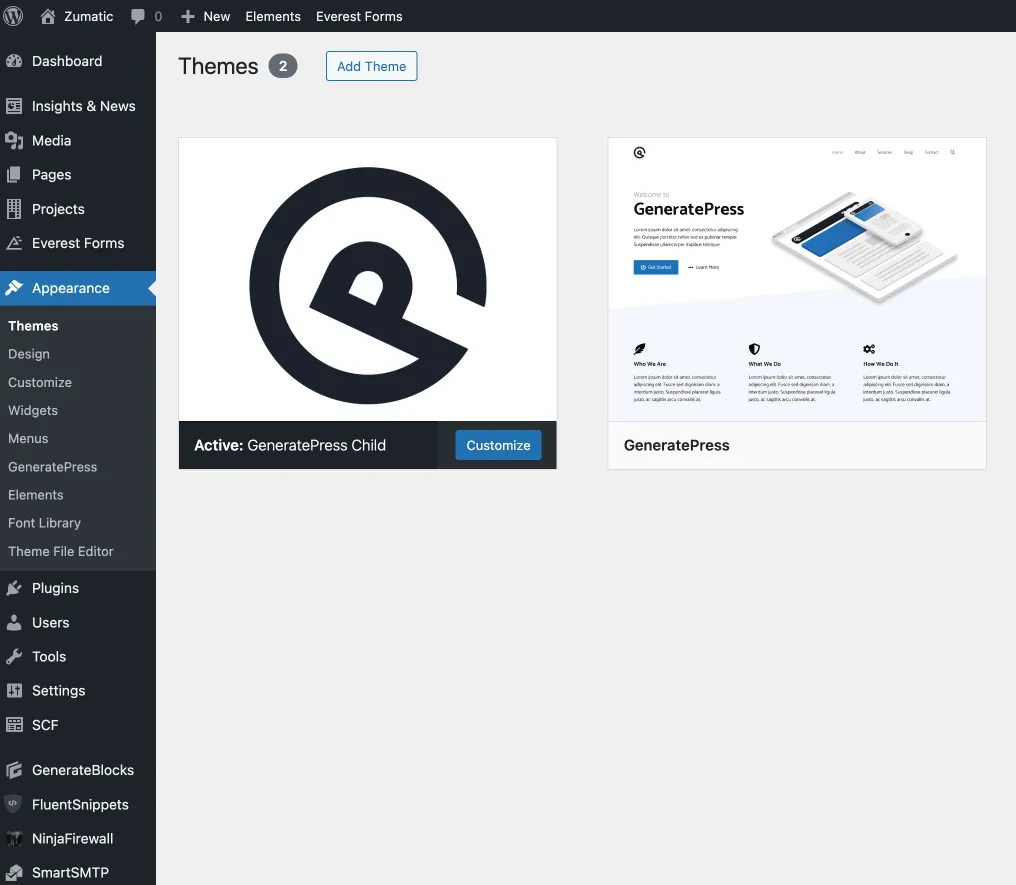
One of the biggest impacts of this project was actually inside the dashboard: it changed from something confusing into something much easier for the internal team to use.
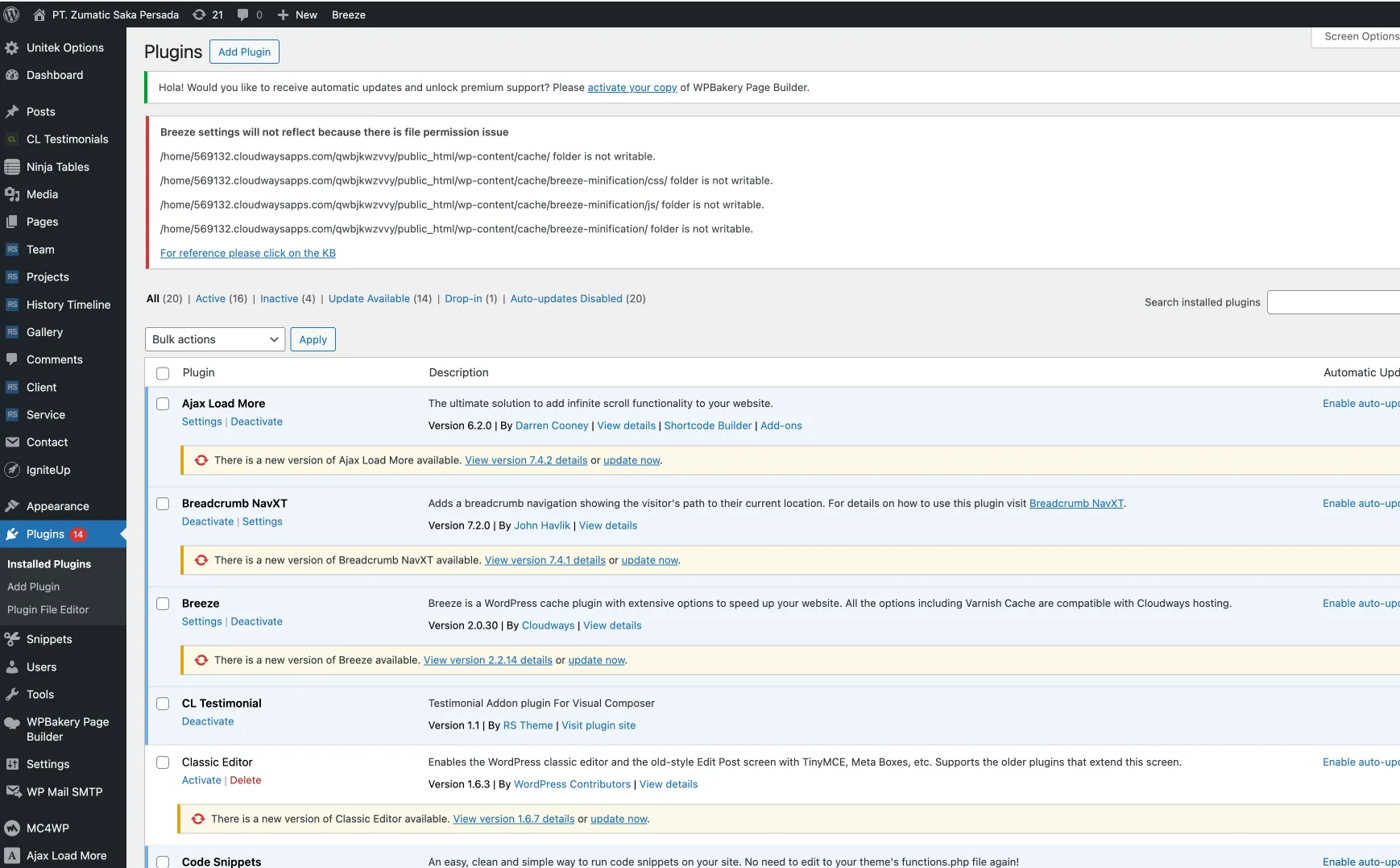
Old WordPress dashboard with a confusing menu and poorly organized plugins
Before — Confusing menu structure and poorly organized plugins.
New WordPress dashboard with simpler menu structure, cleaner custom post types, and clearer labels
After — Simpler menu structure, cleaner CPT setup, and clearer labels.

The new dashboard now provides:

  • a simplified menu structure
  • cleaner custom post types for projects and insights
  • clearer terminology
  • a more efficient daily workflow

Performance Metrics in the Browser

The browser-level comparison shows how the technical work translated into a more efficient loading pattern:
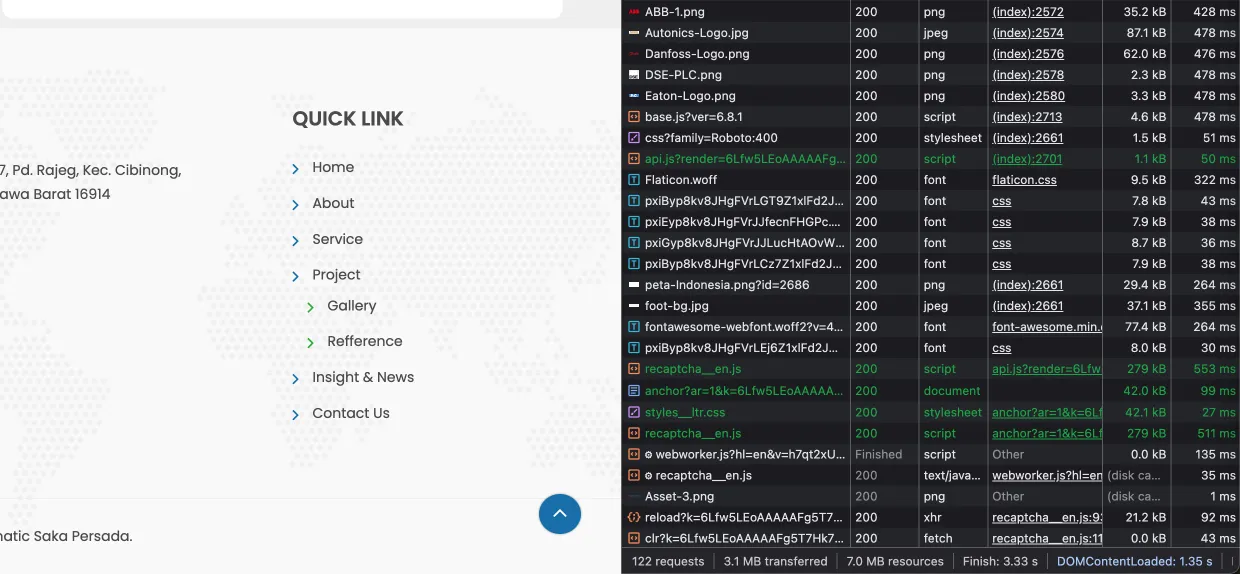
Browser waterfall before optimization with 122 requests and around 7.0MB resources
Before — 122 requests and around 7.0MB resources.
Browser waterfall after optimization with 64 requests and around 5.2MB resources
After — 64 requests and around 5.2MB resources.

That reduction from 122 to 64 requests had a direct impact on loading speed.

Project Page Evolution

The project pages also changed significantly, moving from a rigid system to something much more dynamic and easier to manage:
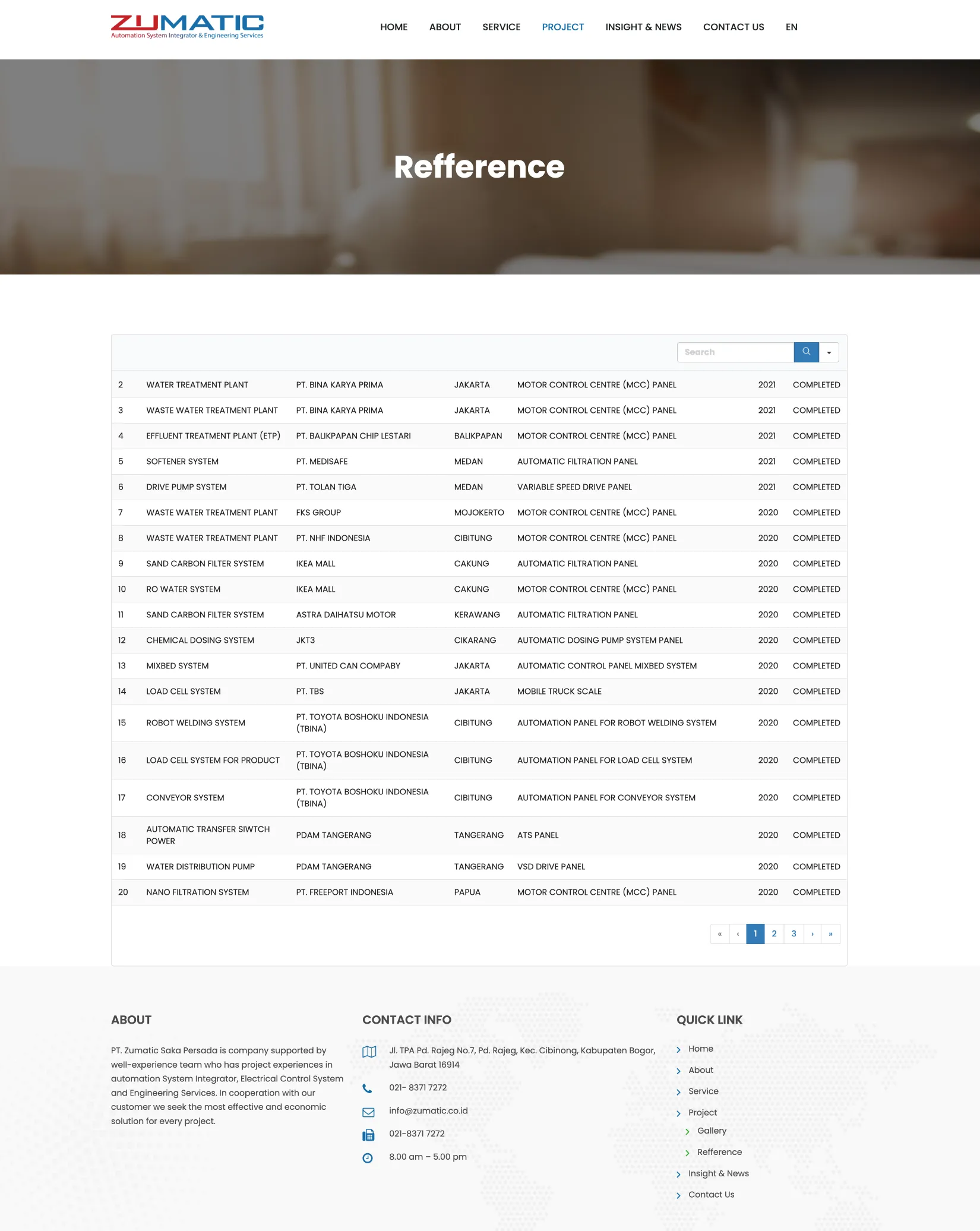
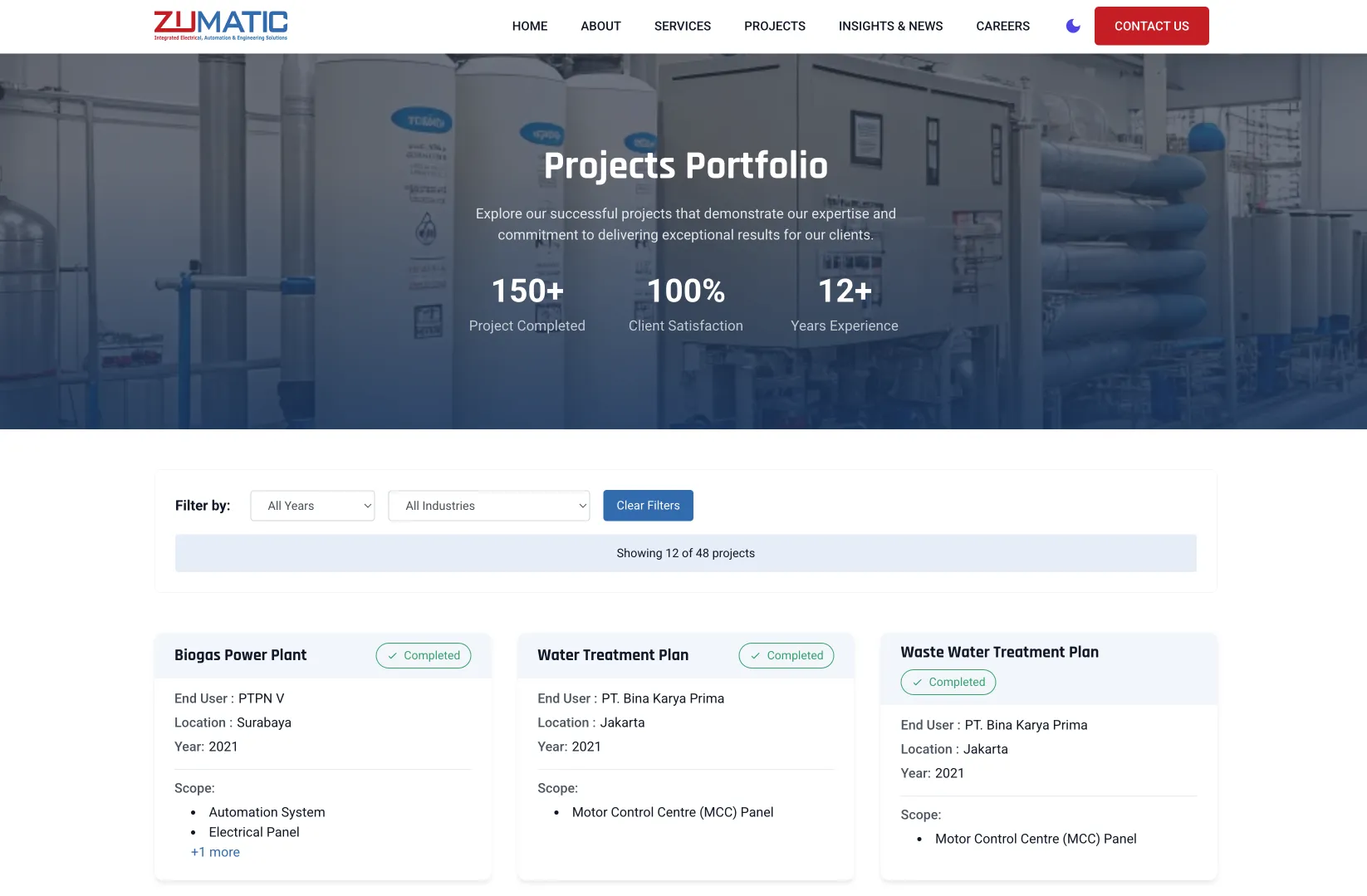
Old projects page built with HTML tables or NinjaTable, difficult for non-technical teams to edit
Before — HTML table/NinjaTable, difficult for non-technical teams to edit.
New projects page with responsive grid, dynamic filters, and easier dashboard management
After — Responsive grid, dynamic filters, and dashboard-driven management.

The new projects page now offers:

  • dynamic filtering by industry and technology
  • a responsive grid layout
  • easier content management through the dashboard
  • more professional presentation

Better Services Page Structure

The services page also became more structured and clearer:
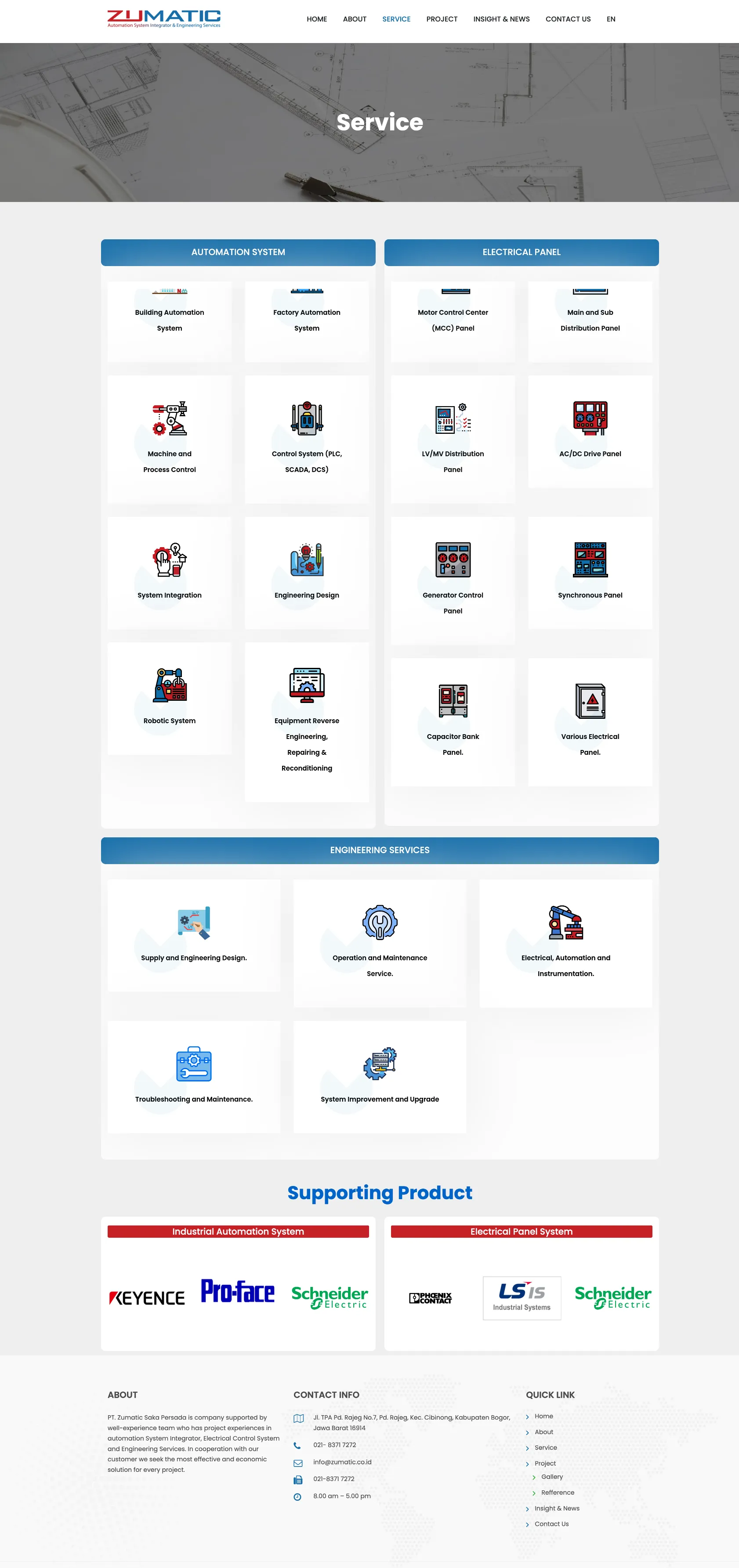
Old services page with basic layout and weak information structure
Before — Basic layout with weak information structure.
New services page with stronger hierarchy, better visuals, and clearer calls to action
After — Stronger structure, better visuals, and clearer calls to action.

Team Workflow Impact

Content management became much easier in practice:

  1. Project management: from raw HTML into a much simpler ACF-based system.
  2. Content creation: a more intuitive interface for different content types.
  3. Multilingual content: a simpler and more effective bilingual workflow.
  4. Media management: cleaner content organization.

Training and adoption results:

After implementation, I gave training to the PT Zumatic team. The outcome was strong:

  • 95% adoption rate: the team could use the new system right away
  • reduced learning curve: training time dropped from 4 hours to 1.5 hours
  • self-sufficiency: the team could manage around 90% of content needs internally

Client Feedback

“This is already perfect. The management process has become very easy. Even though we still need a web developer for certain functions, for day-to-day work like adding a new project, a new page, or a new article, everything is already very easy and not too technical.”

— PT Zumatic Saka Persada Team

Lessons & Best Practices

Key Success Factors

  1. Deep understanding: understand the client’s workflow before designing the solution.
  2. Gradual implementation: reduce disruption by transforming in stages.
  3. Custom solutions: build specifically for the actual need.
  4. User training: invest in adoption so the new system can really be used.
  5. Performance focus: do not trade away speed just to add features.

Best Technical Practices

  1. Plugin minimalism: use only plugins that are truly needed.
  2. Custom development: build custom solutions for specific requirements.
  3. Performance first: evaluate the performance impact of every technical decision.
  4. User-centric design: prioritize ease of use across every interface.
  5. Future-proofing: build systems that are easier to extend later.

Ready to Transform Your Website?

The PT Zumatic Saka Persada project shows that the right transformation can turn a website from an operational burden into a strong business asset that is also easy to manage.

If your website is facing similar challenges, such as slow performance, overly complex content management, or a need for custom functionality, we can help map the right strategy.

Available services:

Short FAQ Before Starting Optimization

Does a website always need a full redesign to become faster?
Not always. Many websites can first be improved by fixing technical bottlenecks such as assets, caching, plugins, database issues, or server configuration before a full redesign becomes necessary.

How do I choose between loading optimization, blocks conversion, or a redesign?
Start with an audit. If the main issue is technical, loading optimization is often enough. If the builder structure is too heavy or the UX is already outdated, blocks conversion or a redesign usually becomes the next step.

Contact us for a free consultation and we will map the most relevant next step for your website.

Willya Randika

Willya Randika

Founder of Harun Studio, web developer, blogger, and hosting reviewer. He helps business owners build healthier websites through design, development, and long-term maintenance.

Related Articles

Explore more insights that connect closely with this topic.