Imagine if every second your website takes to load could cost your business millions in revenue. Sounds dramatic? Unfortunately, that is the reality many online businesses face every day.
Amazon, the global e-commerce giant, found that every 100 milliseconds of loading delay caused a 1% drop in sales. With annual revenue in the hundreds of billions of dollars, that translates into billions lost because of a website that is only a little too slow.
In Indonesia, the numbers may not be as large as Amazon’s, but the impact is just as painful in proportion. Imagine an online business with Rp 10 billion in annual turnover. A 2% conversion drop caused by a slow website means losing Rp 200 million in revenue every year.
Most business owners do not realize that their website may be “burning” money every second it stays slow.
That is why Google introduced Core Web Vitals, a set of metrics that measure website user experience objectively. These are not just technical numbers that only developers care about. They are business indicators that correlate directly with conversion rate, bounce rate, and ultimately revenue.
In this article, I will break down how Core Web Vitals affects your bottom line, with a real case study from PT Zumatic Saka Persada, which improved mobile performance by 75.47% with measurable business impact.
Understanding Core Web Vitals: More Than Just Technical Metrics
The Latest Update: INP Replaced FID
Since March 2024, Google officially replaced First Input Delay (FID) with Interaction to Next Paint (INP) as one of the Core Web Vitals. This was not just a technical update. It was Google’s response to how modern websites have become more interactive.
The three pillars of Core Web Vitals are:
- Largest Contentful Paint (LCP) - measures loading performance
- Interaction to Next Paint (INP) - measures responsiveness
- Cumulative Layout Shift (CLS) - measures visual stability
Why INP Matters for Business
Data shows that nearly 600,000 websites that previously “passed” Core Web Vitals suddenly became “failed” when INP replaced FID. INP is stricter in measuring responsiveness, which is directly tied to user experience and conversion rate.
Optimal business performance thresholds:
| Metric | Good | Needs Improvement | Poor |
|---|
| LCP | 2.5 seconds or less | 2.5-4.0 seconds | More than 4.0 seconds |
| INP | 200 ms or less | 200-500 ms | More than 500 ms |
| CLS | 0.1 or less | 0.1-0.25 | More than 0.25 |
Core Web Vitals as a Google Ranking Factor
Although Google says Core Web Vitals is not a dominant ranking factor, John Mueller from Google has said it is “more than just a tie-breaker.” In other words, when content and relevance are similar, Core Web Vitals can become the deciding factor.
More importantly, the effect on user behavior is far more direct:
- 47% of users expect a website to load in 2 seconds or less
- Bounce probability increases 32% when loading time goes from 1 second to 3 seconds
- Bounce probability increases 90% when loading time reaches 5 seconds
Financial Impact of Core Web Vitals: Data and Case Studies
Global Case Studies: Direct Revenue Correlation
Groupe Renault (2024):
After analyzing 10 million visits, Groupe Renault found a strong correlation between Largest Contentful Paint and conversion rate. Every 1 second improvement in LCP produced:
- 14 percentage point decrease in bounce rate
- 13% increase in conversion
Vodafone Case Study (2024):
By testing two pages that were visually and functionally identical but differed by 31% in LCP score, Vodafone found:
- 8% sales increase on the optimized page
As a local case study, let’s analyze the performance transformation of PT Zumatic Saka Persada that we handled in 2024.
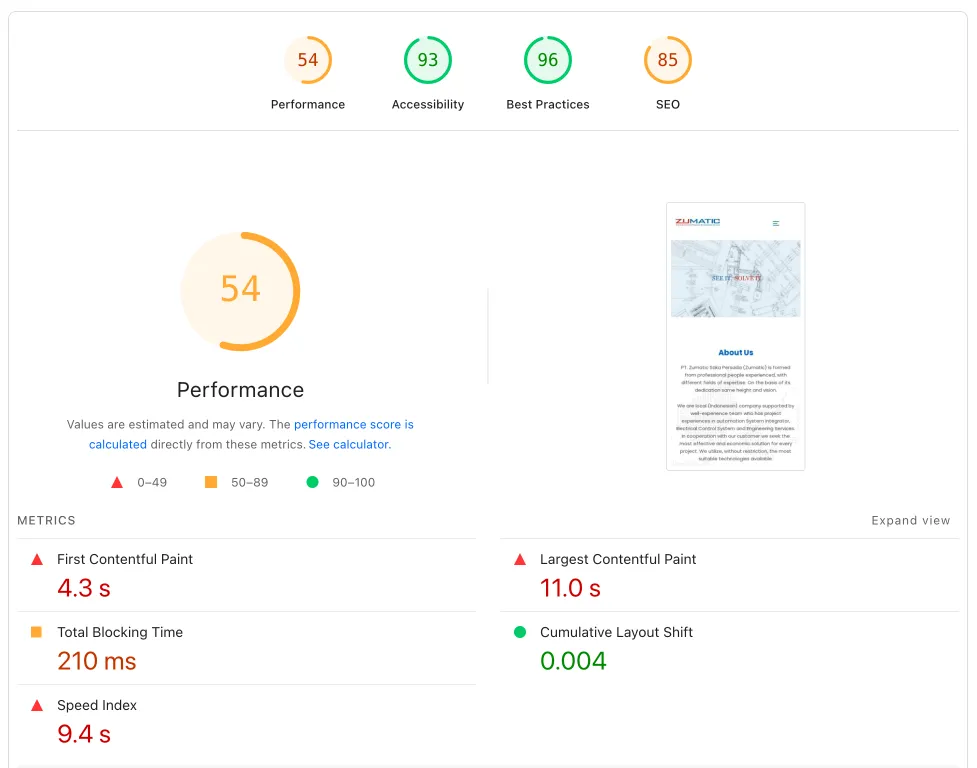
Initial condition before optimization:
| Metric | Mobile | Desktop |
|---|
| Performance Score | 53 | 81 |
| Accessibility | 93 | 98 |
| Best Practices | 96 | 96 |
| SEO | 85 | 85 |
Browser speed test before:
- 122 HTTP requests
- 3.1 MB data transferred
- 7.0 MB total resources
- 3.33 second finish time
- 1.35 second DOMContentLoaded
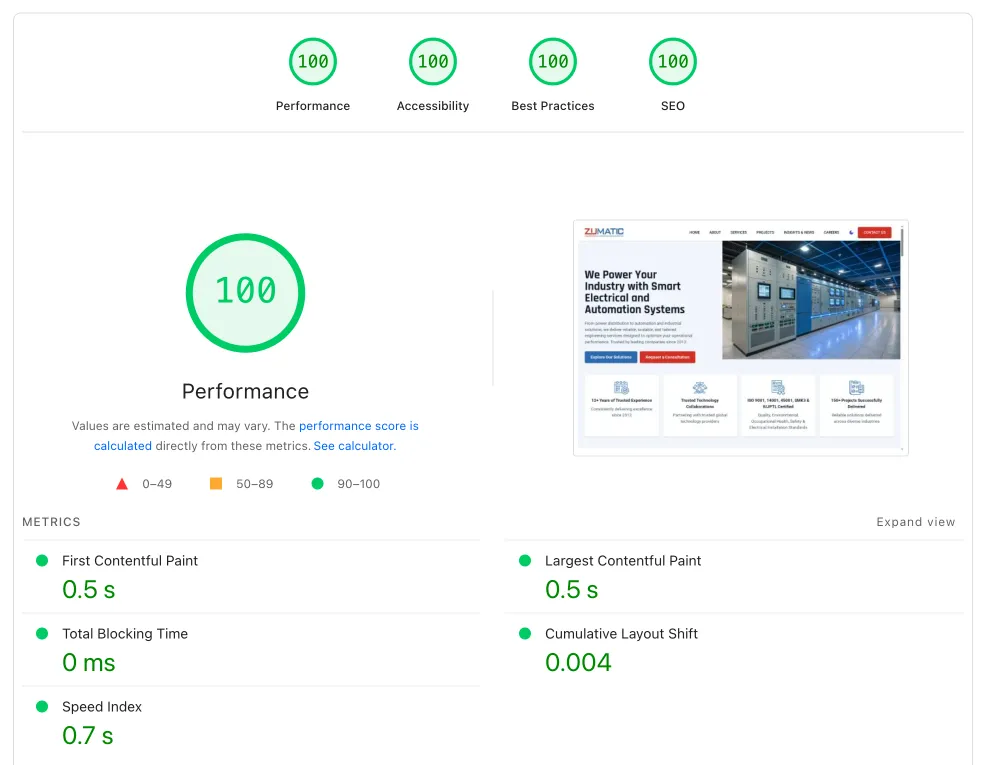
Results after optimization:
| Metric | Mobile | Desktop | Improvement |
|---|
| Performance Score | 93 | 100 | 75.47% (Mobile) |
| Accessibility | 100 | 100 | 7.53% (Mobile) |
| Best Practices | 100 | 100 | 4.17% |
| SEO | 100 | 100 | 17.65% |
Browser speed test after:
- 64 HTTP requests (47.54% reduction)
- 4.8 MB data transferred (optimized content)
- 5.2 MB total resources (25.71% reduction)
- 1.70 second finish time (48.95% faster)
- 1.44 second DOMContentLoaded (maintained)
Technical Implementation: Effective Core Web Vitals Optimization
1. Largest Contentful Paint (LCP) Optimization
Target: 2.5 seconds or less
Main strategies:
A. Image optimization
<img src="hero-image.webp" fetchpriority="high" alt="Hero Image" width="1200" height="600">
B. Critical resource prioritization
- Preload key fonts and images
- Avoid lazy loading for above-the-fold content
- Optimize server response time (TTFB < 600ms)
C. Hosting and CDN
Upgrading hosting infrastructure can make a significant difference. I usually recommend VPS hosting for business websites that need maximum performance.
2. Interaction to Next Paint (INP) Optimization
Target: 200 ms or less
Advanced techniques for 2025:
A. Long Animation Frames (LoAF) API
if ('PerformanceObserver' in window) {
  const observer = new PerformanceObserver((list) => {
    for (const entry of list.getEntries()) {
      if (entry.duration > 50) {
        console.log('Long animation frame detected:', entry);
      }
    }
  });
  observer.observe({entryTypes: ['long-animation-frame']});
}
B. DOM size reduction
- Target DOM nodes under 1,500 elements
- Lazy load content that is not critical
- Use document fragments for multiple element appending
C. JavaScript optimization
- Code splitting to reduce main-thread blocking
- Web Workers for intensive computations
- Optimize event handlers and debounce user interactions
3. Cumulative Layout Shift (CLS) Optimization
Target: 0.1 or less
Practical implementation:
A. Reserve space for dynamic content
.ad-container {
  min-height: 250px;
  width: 300px;
}

.image-placeholder {
  aspect-ratio: 16/9;
  background-color: #f0f0f0;
}
B. Font loading optimization
@font-face {
  font-family: 'CustomFont';
  src: url('custom-font.woff2') format('woff2');
  font-display: swap;
}
C. Proper image dimensions
<img src="image.jpg" width="400" height="300" alt="Description">
- Google PageSpeed Insights
- pagespeed.web.dev - official Google tool
- Provides both lab and field data
- Gives actionable recommendations with priority scoring
- Google Search Console
- Core Web Vitals report with real user data
- Identifies page groups with similar issues
- 28-day rolling average for accurate measurement
- Web Vitals Chrome Extension
- Real-time monitoring while browsing
- Instant feedback during development
- Available on the Chrome Web Store
- Advanced monitoring
For enterprise-level monitoring, consider tools like:
- GTmetrix
- WebPageTest
- New Relic
- Raygun
Warning: Avoid Over-Optimization
John Mueller from Google gave an important warning: it is not worth over-focusing on tweaking scores just for SEO. Chasing the last few percent can take a lot of work, but it will not suddenly make rankings jump.
Focus strategy:
- Prioritize business impact
- Apply the 80/20 rule
- Monitor real user data
- Measure business metrics, not only technical scores
Optimizing Your Website: Next Steps
Assessment and Planning
Before optimization starts, it is important to do a comprehensive audit like the one we did for PT Zumatic:
- Current state analysis
- Core Web Vitals measurement using real user data
- Competitive analysis for benchmarking
- Business impact assessment
- Priority matrix
- High-impact, low-effort improvements for quick wins
- Technical debt that affects long-term performance
- Business-critical features that need special attention