Lately I have been receiving more WordPress cleanup projects with the same general pattern:
- the website suddenly redirects or turns into a gambling site,
- suspicious folders are deleted but keep coming back,
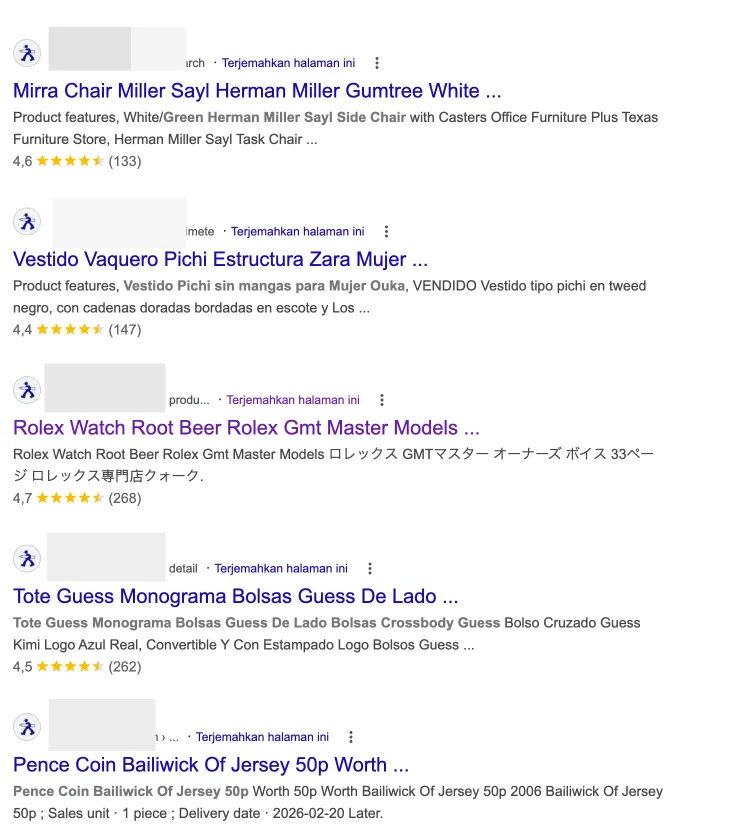
- Google indexing starts showing gambling spam or Japanese spam pages,
- the favicon changes,
- and after a deeper check, it turns out the problem does not stop at one website.
That is the main reason I wanted to write this article: cases like this no longer feel rare.
I keep seeing the same pattern repeat. In one hosting account, one website gets hit first, then the other websites in the same environment begin showing similar symptoms. In other cases, the homepage still looks “normal,” but strange files keep reappearing in the file manager. I have also seen the worst-case scenario: the database gets damaged or lost, there is no clean backup, and the website has to be rebuilt from scratch.
That is why I do not want this to read like a generic security article. I want to approach it from a more practical angle:
- the attack patterns I have been seeing repeatedly,
- why the damage is often larger than what you notice on the homepage,
- and what you should do if your website is already showing these symptoms.
If your website is already showing signs like strange redirects, gambling pages in Google, Japanese spam indexing, or suspicious files that keep coming back, continue with How Malware Gets Into a WordPress Website, 7 Signs Your WordPress Website Is Infected with Malware and How to Fix It, or go directly to our WordPress malware removal service if you need immediate help.
Two Real Case Patterns I Saw Recently
To make this more concrete, here are two types of cases that genuinely came in recently. I am rewriting them in a more anonymous form, but the patterns are real.
Case 1: One Hosting Account, Three Websites, Different Symptoms
In one case, a single hosting account contained three WordPress websites.
The worst one had already been reset at the WordPress and database level. On the surface it looked clean and newly rebuilt, but every night around midnight it turned back into a gambling website. At the same time, Google indexing had already been polluted, including the search result titles and favicon.
The second website in the same account showed a different symptom: a suspicious folder kept reappearing with the same name even after it was deleted.
The third website still looked relatively alive, but strange files kept being added in the file manager even though the visibly compromised page had already been removed.
To me, a pattern like this clearly shows that the problem is not just one bad file. This is already a hosting environment and persistence problem at a broader level.
Case 2: One Conversation, Then It Turned Out 4 or 5 Websites Were Affected
Another case was even more concerning from a scope perspective.
It started with a simple “can you check this?” request. But as the conversation continued, it turned out there were roughly 4 or 5 websites with similar issues inside related hosting environments.
That matters because many website owners still think of malware as a one-website, one-time problem. In practice, I often see infections show up in clusters.
If one website is already compromised, there is a real chance another website in the same environment has also been exposed, even if the symptoms are not visible yet.
The Repeating Pattern I Keep Seeing
If I summarize the recent projects that came in, the pattern usually looks something like this:
1. One Hosting Environment, Multiple Websites, One Gets Hit First and the Problem Spreads
In some cases, clients place several WordPress websites under the same hosting account.
On the surface, that feels efficient. One account, multiple sites, lower cost.
But once one website is compromised, the risk often does not stop there. Other websites in the same account or environment can become exposed too, especially if isolation is weak or file access is too loose.
That is why malware cases in shared environments often feel strange. The client believes only one website is affected, while in reality more than one website may already be exposed or queued up for exploitation.
2. Suspicious Files Get Deleted, Then Come Back Again
This is one of the most frustrating symptoms website owners encounter.
A strange file or folder is deleted today, then tomorrow or the next day it appears again. Sometimes the folder name is the same. Sometimes the files appear in different places. Sometimes the homepage looks clean, but persistence is still active in the background.
For me, this symptom usually means one thing: the real infection source has not been found yet.
Only the symptom was removed, not the root of the problem.
That could mean there is still:
- a leftover backdoor,
- a suspicious admin user,
- a modified core or theme file,
- a cron job,
- compromised hosting panel access,
- or an old plugin or theme that is still acting as the entry point.
3. The Website Looks Normal During the Day, Then Becomes a Gambling Site at Night
I have also seen a very disturbing pattern like this:
the website is reset, WordPress is reinstalled, the database is cleaned, the homepage looks normal, but at a certain time the website switches back into a gambling site.
Once it reaches that stage, the issue is almost certainly not just “one suspicious file.”
There is some persistence mechanism deliberately placed so the infection can reactivate after a surface-level cleanup. That is why I often remind clients that reinstalling WordPress alone does not automatically solve the problem.
If the entry point and persistence layer are not cut off, the website can look recovered for a moment and then break again.
4. SEO Damage Is Often Much Worse Than What You See on the Homepage
Many people only panic when the homepage changes or the site starts redirecting.
But the heavier damage is often already sitting inside Google search results.
I have seen cases where:
- the search titles change,
- spam pages or gambling pages get indexed,
- the favicon changes,
- strange keywords start appearing,
- and a clean business domain starts looking like a spam website in Google.
At that point, the problem is no longer only security. SEO is already damaged too.
And once the legitimate index has been replaced by spam, recovery is not always immediate. Even after the files are cleaned, the traces left in Google Search still need to be handled one by one.
The Worst Risk: It Is Not Just Downtime, It Is the Loss of a Business Asset
In my view, many website owners still think of malware as a technical annoyance.
But in the worst cases, the loss is far more serious than that.
The damage I worry about is not only:
- a website going offline,
- or a homepage being replaced,
but also:
- leads stopping,
- business reputation getting damaged,
- rankings and Google indexing collapsing,
- email reputation being affected,
- the database being corrupted,
- the backup being missing or already infected,
- and finally the site having to be rebuilt from scratch.
When a business website disappears, the damage usually comes from both directions at once:
- the business loses a digital asset that may have taken years to build,
- then it still has to spend money rebuilding that asset again.
And if that rebuild happens in panic mode, it is often more expensive than the preventive work that could have been done much earlier.
Why “Just Delete the Strange Files” Is Almost Never Enough
This is one of the most common misconceptions.
As soon as people see a suspicious file in the file manager, they tend to think:
“If I delete this file, the problem is gone.”
Unfortunately, in many cases that is not enough.
Modern WordPress malware rarely depends on one obvious file. It can leave traces in many places:
- modified WordPress core files,
- compromised upload folders,
- themes and plugins,
- the database,
- hidden admin users,
.htaccess,- cron jobs,
- or even the hosting access itself.
If one file is deleted but the original entry point is still open, the attacker can come back or a leftover script can restore the same infection.
That is why I am usually very careful with websites that people say were “already cleaned several times,” but the same symptoms keep returning. Usually the issue is not that the hosting is “weird.” The issue is that the previous cleanup never covered the full attack surface.
What You Should Not Do in Panic Mode
I understand the urge to fix anything that looks wrong as fast as possible when the site is in chaos. But there are several reactions that often make the situation harder to recover from:
1. Do Not Assume Reinstalling WordPress Solves Everything
If the original access path is still open or the backdoor is hidden somewhere else, reinstalling WordPress only cleans the visible surface.
2. Do Not Delete Only the Files That Look Suspicious
If the malicious file really is isolated, this may appear to work for a while. But if the actual problem lives in admin users, the database, scheduled tasks, or another site inside the same hosting account, the infection will return.
3. Do Not Restore a Backup Unless You Know It Is Clean
This is a common trap. A client feels safe because a backup exists, but that backup was created after the infection had already entered the system.
The result is predictable: the site looks restored, then the symptoms come back.
4. Do Not Change Only the WordPress Password
If you change the WordPress password but do not audit hosting access, FTP, database credentials, and other admin accounts, you have not really closed the door.
What Usually Needs to Be Done Once the Case Looks Like This
Every case is different, but in general my approach usually looks like this:
1. Check the Scope First, Do Not Assume Only One Website Is Affected
If several websites sit under the same hosting account, I usually treat them all as suspicious first.
That matters, because cleaning one site while leaving another infected often creates a loop where the same problem keeps returning.
2. Audit Access and Entry Points
I usually want to know:
- which WordPress version is running,
- which plugins and themes are active,
- whether nulled plugins or themes are involved,
- who the admin users are,
- whether hosting or cPanel access is shared too loosely,
- and whether there are other websites under the same account.
Without that, cleanup often becomes random file deletion without direction.
3. Clean Files, the Database, and Persistence Mechanisms
Proper cleanup is rarely just a file manager job.
The areas that often need inspection include:
- core WordPress files,
- plugins and themes,
- upload files,
- the database,
- admin users,
- redirect rules,
- scheduled tasks,
- and any other persistence traces that allow the malware to come back.
4. Handle SEO Damage and Google Indexing
If spam pages, gambling pages, or Japanese spam pages have already been indexed, the job is not finished even after the website is technically clean.
Google indexing also needs attention.
That is why I consider proper malware cleanup to require two results at once:
- the website is clean technically,
- the domain is recovering in search results as well.
5. Close the Root Cause, Not Just the Symptom
After cleanup, I prefer to move directly into prevention:
- delayed updates,
- overcrowded hosting environments,
- undisciplined backup practices,
- too many admin accounts,
- loose panel access,
- and a maintenance workflow that was not really active before.
If those root issues stay in place, the same website can easily return to the same condition a few months later.
Once the Website Is Clean, the Next Step Is Even More Important
I know most clients focus on one thing:
“I just need my website to work normally again.”
That makes sense. But once the site is normal again, the more important question becomes:
how do we stop this from happening again?
At that point, I think three areas matter the most.
1. Routine Maintenance Is No Longer Optional
If a WordPress website supports a business, maintenance is not an extra task. It is part of the basic defense layer.
And by maintenance, I do not just mean clicking the update button. I mean a more complete routine:
- updating core, plugins, and themes,
- keeping backups that can actually be used,
- monitoring errors,
- monitoring security,
- and spotting strange signals before they grow into a larger problem.
If you want a more structured route, see our website maintenance service and also read Why WordPress Maintenance Matters.
2. The Hosting Environment Needs a Serious Review
If several websites sit under one hosting account and one of them has already been compromised, I usually recommend a serious review of the foundation.
That does not mean all shared hosting is automatically bad. It is not that simple.
But for a business website, I feel more comfortable when the foundation is more disciplined:
- healthier isolation,
- tighter access control,
- clearer backup handling,
- more responsive support,
- and a setup that is easier to investigate when something goes wrong.
If you want to think more carefully about the hosting side of the problem, continue with When Your Website No Longer Fits Its Current Hosting or Why Business Owners Often Prefer Managed Hosting Over Control Panels.
The most expensive cases I have seen were not just hacked websites. They were websites that could no longer be restored because the backup did not exist or was not usable.
If the database is corrupted, the files are damaged, and there is no clean backup, the remaining option is often a rebuild.
That is why I always see backups as part of business strategy, not a technical checklist.
So Why Do WordPress Websites Suddenly Turn Into Gambling Sites?
If I had to answer in one sentence:
because the problem usually comes from a combination of a loose foundation, delayed maintenance, an unhealthy hosting environment, and a security process that has been too reactive for too long.
A website usually does not turn into a gambling site because of one dramatic moment.
It turns because several doors were left open for too long.
And by the time the attack becomes visible on the surface, the damage has often already spread to:
- files,
- the database,
- Google indexing,
- domain reputation,
- and business operations.
If Your Website Is Showing These Symptoms Right Now
If your website is currently showing signs like:
- gambling pages or Japanese spam pages appearing in Google,
- a changed favicon,
- suspicious folders coming back after deletion,
- strange redirects,
- or several websites in the same hosting environment beginning to act strangely,
then I would not stop at “delete the suspicious file.”
Start with a more complete response.
You can:
For me, the real goal is not just “make the website work again today,” but to stop your business website from staying in a permanently vulnerable state.

 SECURITY